The dangerous AI report is not always the messy one. The more expensive version is neat, confident, and just wrong enough that a reviewer has to unwind the logic line by line.
I have seen this pattern around planning memos, vendor comparisons, weekly status notes, and customer-feedback summaries. Someone asks AI to make the report faster. The draft arrives in a clean structure. The headings are reasonable. The tone sounds calm. Then a reviewer spends the next hour checking whether the numbers match the sheet, whether a source is missing, whether one conclusion is too strong, and whether the recommendation can actually be sent to a director.
That is not productivity. That is work moved to a less visible place.
The word many researchers now use is workslop: AI-generated work that looks like progress but does not carry enough substance to advance the job. Harvard Business Review, drawing on BetterUp Labs and Stanford Social Media Lab work, reported that 40% of surveyed U.S. full-time employees had received workslop in the previous month. Workers who saw it estimated that 15.4% of the work content they received qualified. Glean’s Work AI Index 2026 uses a neighboring term, botsitting, for the human time spent checking, rerunning, and repairing AI output.
Those words are useful, but I care more about the operating question: when does an AI report stop saving time and start creating review debt?
Operating judgment from the field
If I were putting AI report generation into a real workflow, I would not start with the prompt. I would start with the acceptance rule.
Before a draft can leave the person who generated it, the report has to answer five questions:
| Gate | What the reviewer needs to see |
|---|---|
| Source trail | Which documents, rows, calls, tickets, or pages were used |
| Metric rule | Which definition changed, which period was used, and what was excluded |
| Human owner | Who accepts the recommendation, not just who ran the prompt |
| Exception note | Which unclear cases were left out, guessed, or manually corrected |
| Next action | What decision this report is supposed to support |
If the draft cannot pass those five gates, I would not send it downstream. I might still use it as a private working draft, but I would not treat it as a team artifact.
That distinction matters. A private draft can be messy. A team artifact changes other people’s priorities.
What the research says about the hidden cost
The HBR workslop piece is uncomfortable because it puts numbers around a familiar annoyance. The reported invisible tax was estimated at $186 per month per affected worker. HBR also notes that, at a 10,000-person organization and the estimated prevalence in the survey, the annual productivity loss could reach more than $9 million.
I would not copy that number into a business case without checking my own environment. Salary mix, review habits, tool maturity, and reporting culture all change the result. But the direction is believable. A bad AI draft does not stay inside the AI tool. It enters Slack, email, a meeting deck, a spreadsheet comment, or a planning review. Then someone else pays the time cost.
Glean’s 2026 Work AI Index points at the same operational issue from another angle. It says workers spend an average of 6.4 hours a week botsitting. It also breaks AI time into checking, actual production, and learning or building agents. The important lesson is not that AI is useless. The lesson is that the labor around AI is now part of the workflow, whether the team measures it or not.
Microsoft’s 2026 Work Trend Index makes the broader point that agents and human agency are becoming a normal part of organizational work. That raises the standard. If AI is moving from side experiment to operating layer, “the draft looked fine” is not enough.
A realistic report failure, not a dramatic one
Here is the kind of case that matters because it happens quietly.
A revenue operations lead asks an AI tool to turn a CRM export and three meeting notes into a weekly pipeline report. The first draft says enterprise pipeline increased, onboarding risk is down, and the main action is to push two late-stage deals. The memo is only two pages. It reads well.
The sales director checks the source sheet and finds three issues.
| AI draft line | What the reviewer finds | Why it matters |
|---|---|---|
| “Enterprise pipeline increased 18%” | The export includes duplicate renewed opportunities | The direction might be true, but the number cannot be trusted |
| “Onboarding risk decreased” | Two customer-success notes were missing | The report hides the main operational risk |
| “Push two late-stage deals” | One deal is waiting on legal language, not sales follow-up | The next action points to the wrong owner |
| “Forecast confidence is improving” | The prompt mixed weighted and unweighted pipeline | The report uses a metric nobody approved |
Nothing here is spectacular. No model hallucinated a fake company. No one published a legal claim. The problem is more ordinary: the AI turned partial input into a complete-sounding memo.
The reviewer does not merely correct typos. They rebuild the logic. They check the export, ask RevOps for the dedupe rule, ping customer success for missing notes, rewrite the recommendation, and add a caveat. The original writer still feels faster. The team as a whole may not be faster at all.
Where the review time hides
AI reporting creates hidden work in five places.
| Hidden work | What it looks like in the calendar | Failure signal |
|---|---|---|
| Source checking | Someone opens every linked file again | The draft has claims without traceable evidence |
| Metric repair | A manager asks what the number actually means | The same KPI has two definitions in one report |
| Tone repair | A senior person rewrites cautious language | The draft sounds more certain than the data allows |
| Ownership repair | A meeting is needed to decide who acts | The recommendation names an action but no owner |
| Exception repair | Edge cases are found after the report is shared | The draft does not say what it ignored |
These are not cosmetic edits. They are operating tasks.
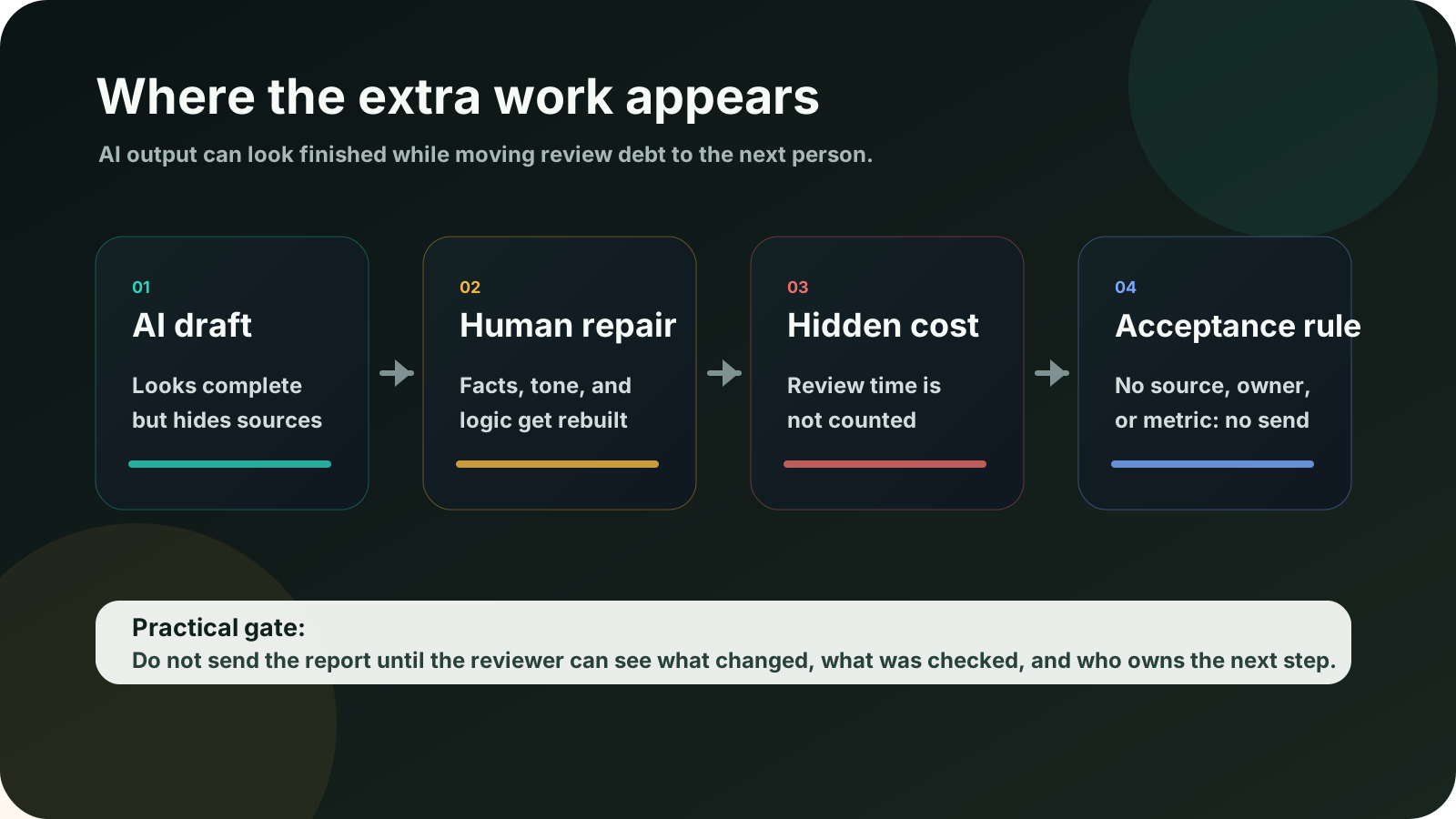
That is why I would not measure an AI reporting workflow by “time to first draft.” I would measure time to accepted report. First draft speed is useful only if the acceptance cost falls with it.
The acceptance rule I would put in front of AI reports
For reports that go beyond personal notes, I would use a plain acceptance rule.
| Required before sharing | Minimum standard |
|---|---|
| Source list | Every major claim points to a source file, meeting, ticket group, or dataset |
| Metric definition | The report names the date range, denominator, excluded rows, and owner of the metric |
| Confidence label | Claims are marked as confirmed, directional, or needs-check |
| Exception log | Missing data and excluded cases are named instead of hidden |
| Decision request | The report says what decision, approval, or follow-up it is asking for |
| Human owner | One person is accountable for sending it, not “the AI” |
I would keep this rule short. If it becomes a twelve-page governance manual, people will skip it. The point is to stop polished but unsupported drafts from entering the workflow.
My preferred first move is simple: add a top block to every AI-assisted report.
Report status: draft / checked / ready to send
Sources used:
Metric owner:
Open questions:
Known exclusions:
Decision requested:
Human sender:
If those fields look annoying, that is useful information. It means the report was not ready.
When I would still use AI for reports
I would still use AI heavily. I would just keep it in the right part of the flow.
AI is good for:
- turning raw notes into a first structure,
- spotting missing sections,
- making a long report easier to scan,
- generating alternative headlines,
- converting bullet notes into a table,
- comparing two versions of the same memo,
- drafting questions for the reviewer.
I would choose AI for those jobs because the risk is contained. The human still owns the claim, the metric, and the decision.
The best reporting use case I see is not “write the report for me.” It is “show me what I need to verify before I send this.” That prompt changes the relationship. The tool becomes a reviewer assistant, not an invisible author.
When I would not send the AI draft
There are cases where I would not send the draft at all.
| Do not send if | First corrective move |
|---|---|
| The report has a confident claim with no source | Ask for a source map before editing the prose |
| The metric definition is unclear | Freeze the number until the owner confirms the rule |
| The draft recommends an action without an owner | Rewrite the recommendation as an open question |
| The tone sounds more certain than the evidence | Replace the claim with a narrower, dated statement |
| The report hides missing data | Add an exception log before sharing |
| The reviewer has to rebuild most of the logic | Narrow the AI task to outline or extraction only |
| The draft is mostly a polished summary of already-known work | Do not circulate it as a new artifact |
This is the part many teams avoid because it feels negative. I see it differently. Non-selection criteria protect the workflow. They tell people when AI is useful and when it is just making someone else clean up the mess.
A two-hour pilot that reveals the real cost
Before rolling this out across a team, I would run one practical pilot.
Pick one recurring report. Run it with AI for two cycles. Do not ask whether the draft looked better. Track the operating cost.
| Measurement | How to track it |
|---|---|
| Time to first draft | From prompt start to draft saved |
| Reviewer minutes | Time spent checking sources, metrics, and recommendations |
| Number of source corrections | Count any claim that needed evidence repair |
| Number of metric corrections | Count definition, date-range, or denominator fixes |
| Number of owner corrections | Count actions that had to be reassigned |
| Number of caveats added | Count missing-data or exception notes added by humans |
| Final-send confidence | Ask the sender to score trust from 1 to 5 |
If the first draft gets faster but reviewer minutes go up, the workflow did not improve. It only changed who absorbed the cost.
If reviewer minutes fall and source traceability improves, then the AI flow is worth expanding.
Questions before accepting a polished report
Is AI-generated workslop the same as hallucination?
No. Hallucination is often a false fact. Workslop can be factually plausible but still low-value because it lacks judgment, source traceability, decision context, or ownership. A report can contain mostly true sentences and still waste the team’s time.
Should every AI report have citations?
For personal thinking, no. For a report that affects another person’s work, yes, at least at the claim level. The reviewer should not have to reverse-engineer where the answer came from.
Does a better model solve this?
A stronger model reduces some drafting errors, but it does not remove the need for acceptance criteria. Better models can also make weak drafts sound more polished, which may make the review problem harder to notice.
What is the easiest starting rule?
Require every AI-assisted report to name its sources, metric owner, open questions, excluded data, requested decision, and human sender. Keep the rule visible at the top of the document.
How do I know if the workflow is worth keeping?
Measure accepted-report time, not first-draft time. If people spend less time checking and still trust the final result, keep going. If review time rises, reduce the AI role to outlining, extraction, or gap-finding.
The call I would leave with the team
AI reporting is not bad. Unowned reporting is bad.
The practical move is to stop treating a polished draft as a finished artifact. If the report has no source trail, no metric owner, no exception log, and no clear decision request, it is not ready. It may be useful private material. It is not ready to move through the team.
That is the rule I would use before buying more tools, adding more prompts, or asking people to produce more “AI-assisted” updates. A report should make the next person’s work lighter. If it makes the next person investigate, rewrite, and take responsibility for an unsupported conclusion, the team has not automated reporting. It has automated the handoff of unfinished work.
References and reporting
Public pages used for reported facts, official documentation, policy background, product details, and claims that may change.
- AI-Generated Workslop Is Destroying ProductivityHarvard Business ReviewUsed for: workslop definition; reported prevalence; estimated productivity costChecked: 2026-08-25
- Workslop: The Hidden Cost of AI-Generated BusyworkBetterUp LabsUsed for: research background; workslop framingChecked: 2026-08-25
- Work AI Index 2026Glean Work AI InstituteUsed for: botsitting; hidden human labor; AI session failure and reworkChecked: 2026-08-25
- 2026 Work Trend Index reportMicrosoft WorkLabUsed for: agent adoption context; human agency framingChecked: 2026-08-25
- Workers are spending hours every week botsittingTechRadarUsed for: secondary reporting on botsitting; reader-friendly summaryChecked: 2026-08-25