
The short answer I would use at work
If an AI task has to be repeated, I would not keep the important instructions inside a chat window. I would put them in a Markdown work instruction.
The reason is not that Markdown is fashionable. The reason is more boring, and more useful. A Markdown file can sit next to the work, be reviewed in a pull request, be copied into another tool, and be updated after the next run. A long prompt usually disappears into chat history. Even when someone saves it, the saved text often mixes the permanent rule, the temporary situation, and the operator’s mood from that day.
That distinction matters once AI automation moves beyond a single answer. OpenAI documents project instruction files such as AGENTS.md for Codex, and Codex Skills are also file-based instructions. Claude Code has its own memory and settings surfaces. MCP also treats reusable prompts as a structured server capability. Different products use different words, but the operating lesson is the same: repeated AI work needs a durable instruction layer outside the conversation.
My rule is simple. A prompt is fine when I want one answer. A Markdown work instruction is better when I want the next run to be less dependent on my memory.
Why long prompts start to fail
Long prompts look productive because the first result improves quickly. Add more background, more constraints, a few examples, and the answer gets better. That is useful during the first pass.
The trouble starts on the third or fourth run.
Someone asks, “Which version of the prompt did you use?” Another person adds one more exception to the bottom. A file path changes. A report column is renamed. The approval rule changes after a mistake. The prompt still looks complete, but nobody knows which lines are permanent and which lines came from one special case.
That is where I see AI automation lose time. Not because the model cannot write. It loses time because the handoff is soft.
| Prompt habit | What happens later | Markdown instruction habit |
|---|---|---|
| Paste a long block into chat | No version history | Keep the rule in a file |
| Explain the same context again | Operators drift | Reuse the same background section |
| Ask for “a table” | Output shape changes | Name every required field |
| Mention exceptions casually | Edge cases get missed | Put stop conditions in their own section |
| Trust the answer visually | Review gets subjective | Add commands or checks |
| Keep examples in chat | Examples disappear | Store examples under the rule |
| Leave ownership unclear | Nobody updates the prompt | Name the owner and update trigger |
| Fix mistakes manually | The next run repeats them | Patch the Markdown file |
The table is not theory for me. It is the kind of thing that shows up after a month of real work: a good first answer, followed by three people quietly repairing the same weak instruction.
When Markdown is the right tool
Markdown is not a magic layer. It is useful when the work has enough repeatability to deserve a file.
I would choose a Markdown work instruction for these jobs:
- monthly vendor comparison notes
- customer feedback classification
- meeting memo cleanup
- internal policy draft review
- spreadsheet-to-summary reporting
- release note preparation
- support ticket routing
- repetitive research briefs
The shared pattern is not “AI writing.” The shared pattern is handoff. There is an input, a required output, a review point, and some rule that should survive the current conversation.
I would not choose it for every interaction. Do not choose a Markdown file when the question is one-off, the work is still exploratory, or the real decision criteria are not known yet. In that situation, the file becomes ceremony. First talk through the problem. After the work repeats twice and the same correction appears again, turn the correction into a rule.
The operating call I would make: a good instruction file is smaller than people expect
The mistake I see most often is turning a work instruction into a manual nobody wants to open.
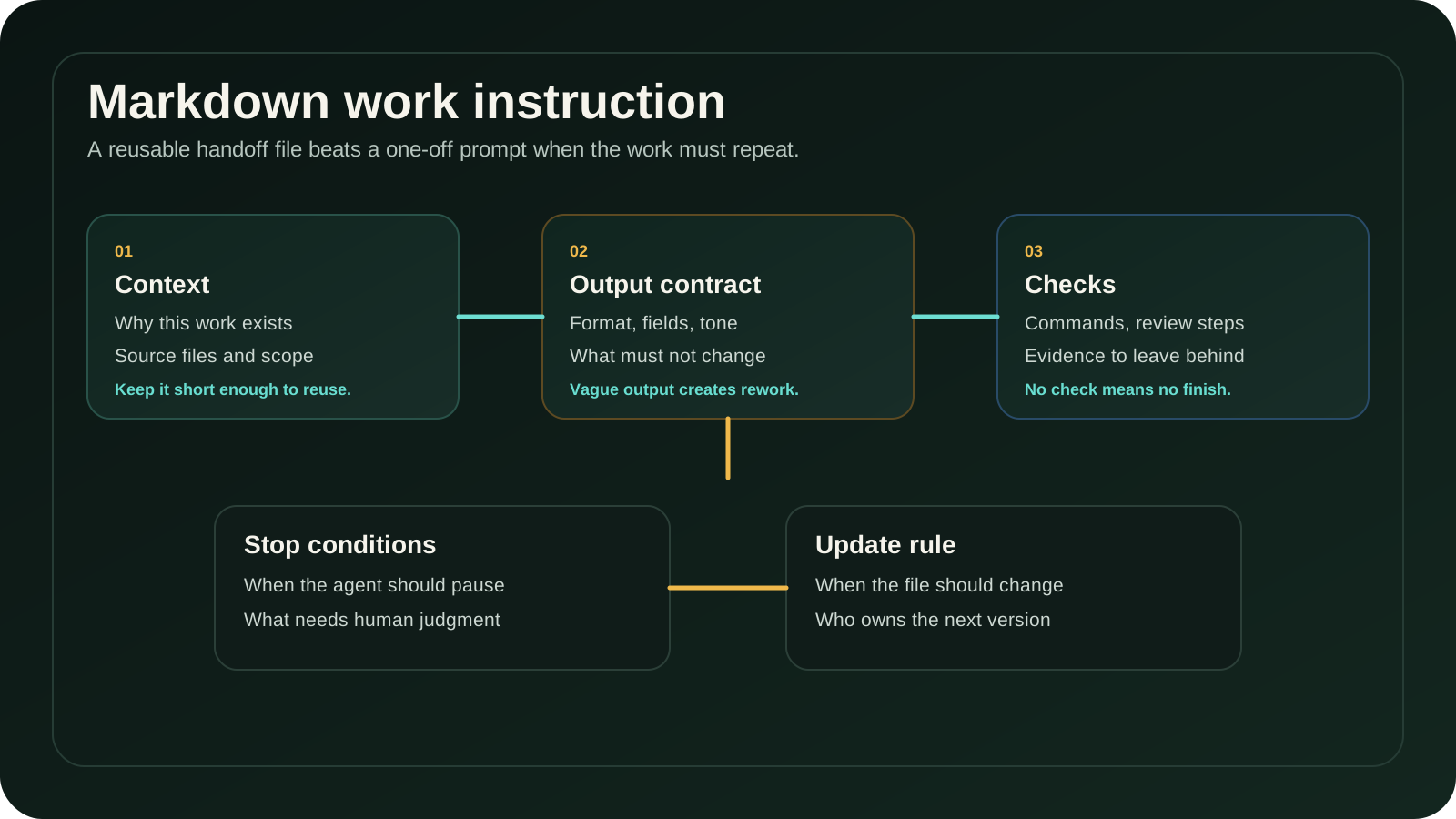
A practical file is usually short. It does not explain the whole business. It does not describe every possible situation. It gives the AI and the human operator enough structure to run the job without inventing the rules again.
I look for nine sections.
| Section | What I put there | Failure signal |
|---|---|---|
| Purpose | Why this work exists | The AI optimizes the wrong thing |
| Background | Only the context needed for this job | The file reads like a company wiki |
| Inputs | File paths, source names, date range, fields | The agent guesses what to use |
| Output contract | Required format, headings, fields, tone | Every run returns a different shape |
| Decision rules | How to classify, rank, approve, or reject | The result depends on wording mood |
| Forbidden actions | What not to change or touch | The agent edits outside the work area |
| Checks | Commands, visual review, source cross-checks | Nobody knows whether the run is finished |
| Stop conditions | When the agent must pause | Risky work gets pushed forward silently |
| Update rule | When this file should change | The same mistake appears next month |
If those nine sections fit on two or three screens, the file has a chance. If the file needs a table of contents before the first run, I usually split the work.
A template I would actually hand to an operator
Here is the shape I would start from. I keep the language plain because a work instruction is not a brand document. It is a working file.
# Work instruction: [job name]

## Purpose
- Why this job exists:
- Who uses the output:
- What decision this output supports:

## Inputs
- Source files:
- Date range:
- Systems to check:
- Fields that must not be guessed:

## Output contract
- Format:
- Required sections or columns:
- Tone:
- File name or destination:
- What must stay unchanged:

## Decision rules
- How to classify:
- How to rank:
- What counts as enough evidence:
- What needs human judgment:

## Forbidden actions
- Do not edit:
- Do not publish:
- Do not delete:
- Do not infer:

## Checks before finish
- Command or validation:
- Visual/manual check:
- Source check:
- Link or file check:

## Stop conditions
- Stop if:
- Ask the owner if:
- Leave a note if:

## Done means
- Output exists at:
- Checks passed:
- Open questions are listed:
- Owner can rerun from this file:

## Update rule
- Patch this file when:
- Owner:
- Last reviewed:
The most important line is not the title. It is “fields that must not be guessed.” That one line saves more rework than people expect.
Example: monthly vendor comparison memo
Take a practical operations job: a monthly vendor comparison memo for support tooling. The output goes to a manager who wants three things: cost movement, adoption signal, and whether any vendor needs a follow-up call.
Without a work instruction, the AI request often sounds like this:
Compare the vendor reports and write a summary.
That request is too thin. The model can produce a readable memo, but it may miss the business rule. The useful Markdown version is more specific:
- Use only the current month’s export and the previous month’s export.
- Do not compare list price if the renewal quote exists.
- Separate usage growth from seat growth.
- Flag a vendor only when spend increased by more than 12 percent and usage did not increase.
- Put unknown contract terms in an “open questions” section.
- Do not recommend cancellation unless there is both low usage and an owner confirmation.
Now the AI has a job. It is not just “write a memo.” It has a measurement rule, an exception rule, and a stop condition.
That is the practical value of Markdown. The file carries the judgment that would otherwise stay in the operator’s head.
Completion criteria and stop conditions
I would not let an AI automation task finish just because it produced text. Text is easy. A finished run needs evidence.
For a Markdown work instruction, “done” should include at least four checks:
- the expected output file or page exists
- required fields are present
- source files used by the AI are named
- exceptions and missing data are listed instead of hidden
Stop conditions matter even more. They are where the file protects the workflow from confident nonsense.
Use stop conditions like these:
- Stop if the source file is missing.
- Stop if two sources disagree on a number.
- Stop if the requested output would publish externally.
- Stop if customer, payment, legal, or security data appears unexpectedly.
- Stop if the instruction asks for deletion, irreversible edits, or account changes.
- Stop if the result needs a business judgment not listed in the file.
This is where a Markdown instruction becomes more than a prompt. It becomes a boundary.
The first seven days of rollout
I would not introduce this as a big process project. I would pick one repeated task and run a one-week trial.
Day 1: take a task that already repeats and write the first Markdown file. Keep it under three screens.
Day 2: run the task once and write down every place where the AI guessed.
Day 3: turn those guesses into input rules, output rules, or stop conditions.
Day 4: ask another operator to run the same file without extra explanation.
Day 5: measure rework. Not model accuracy in the abstract. Count how many corrections the human still had to make.
Day 6: decide what belongs in the file and what belongs in a separate checklist.
Day 7: either promote the file as the default path or delete it. A bad instruction file is worse than no file because it gives people false confidence.
That last step is important. If the file does not reduce repeated explanation or review effort, do not keep it for decoration.
What to connect next
Once the Markdown file works, it can become the bridge into heavier automation.
Codex-style project instructions can tell an agent how to behave inside a repository. Skill files can hold reusable procedures. Claude Code memory can keep project context available across runs. MCP prompts can expose reusable request shapes from a server. Those are not the same product feature, but they point in the same direction: reusable context beats ad hoc prompting when the work repeats.
The order I would use is:
- Write the Markdown work instruction.
- Run it manually with AI assistance.
- Add checks and stop conditions.
- Move stable parts into an agent instruction, skill, or prompt template.
- Keep the human approval point until the failure rate is boring.
Do not automate the messy version. First make the instruction stable enough that a person can rerun it.
Before you choose this pattern
Choose Markdown when the work has repeat value, ownership, and a clear output contract. Do not choose it just because the team wants to look more systematic.
The fastest test is this: hand the file to another person and say nothing. If they can run the job and know when to stop, the file is useful. If they ask five clarifying questions before starting, the work instruction is still mostly inside your head.
That is not a writing problem. It is an operating problem. The Markdown file only exposes it earlier.
Questions that change the decision
Is this just prompt engineering with a file extension?
No. Prompt engineering improves a request. A Markdown work instruction improves the handoff around the request: where the inputs are, what the output must look like, who reviews it, and when the agent should stop.
Should every AI task have a Markdown file?
No. One-off questions do not need the overhead. Repeated work, shared work, file-based work, and review-sensitive work are better candidates.
Where should the file live?
Put it where the work lives. In a repository, that may be an AGENTS.md-style file or a /docs/operations/ folder. In a business workspace, it may live next to the source spreadsheet or reporting folder. The file must be easy to find during the next run.
What is the first section to improve after a failed run?
Start with stop conditions and output contract. Most failures I see come from the AI guessing a field, skipping an exception, or producing a shape that cannot be handed to the next system.
References and reporting
Public pages used for reported facts, official documentation, policy background, product details, and claims that may change.
- OpenAI Codex AGENTS.md guideOpenAIUsed for: Project instruction files; agent contextChecked: 2026-08-25
- OpenAI Codex Skills documentationOpenAIUsed for: Reusable task procedures; skill filesChecked: 2026-08-25
- Claude Code memory documentationAnthropicUsed for: Project memory; persistent contextChecked: 2026-08-25
- Claude Code settings documentationAnthropicUsed for: Project settings; permission boundariesChecked: 2026-08-25
- Model Context Protocol prompts specificationModel Context ProtocolUsed for: Reusable prompt templates; prompt structureChecked: 2026-08-25