Google released ‘google/agents-cli’, and the first temptation is to file it under another agent tool. I would not. The more useful reading is narrower and more operational: Google has packaged a route for coding agents to build, test, deploy, and watch ADK agents without guessing each step from scattered docs.
That distinction matters. A lot of teams can make an agent demo now. The harder work starts right after the demo: deciding what the agent is allowed to read, what counts as a failed answer, who approves the output, where logs live, and what happens when a deployment needs to be rolled back.
Why this caught my eye
I have become less impressed by the phrase “build an agent” than I used to be. The first version is rarely the problem. The problem is the second week, when someone asks why the answer changed, whether the agent used the right source, and who owns the fix.
That is why ‘agents-cli’ is interesting. The official GitHub page says clearly that it is not an alternative to Codex, Claude Code, or Antigravity CLI. It is a tool for those coding agents. Its job is to make them better at building, evaluating, and deploying ADK agents on Google Cloud.
That sounds less flashy than “new AI coding agent,” but it is the part I would actually inspect. If a tool can make the boring agent lifecycle more explicit, it is worth a closer look.
The work sample I used
I would not start with a public support bot. I would start with an internal triage agent for incoming vendor or policy questions.
The input packet is deliberately small:
- one incoming request,
- one current policy document,
- one account or project status note,
- one expected output format.
The agent should return a short answer draft, cite the source paragraph, mark whether a person must review it, and assign the next owner. That is enough to test whether the agent can survive real work without turning into a loose chat window.
What I compared in practice
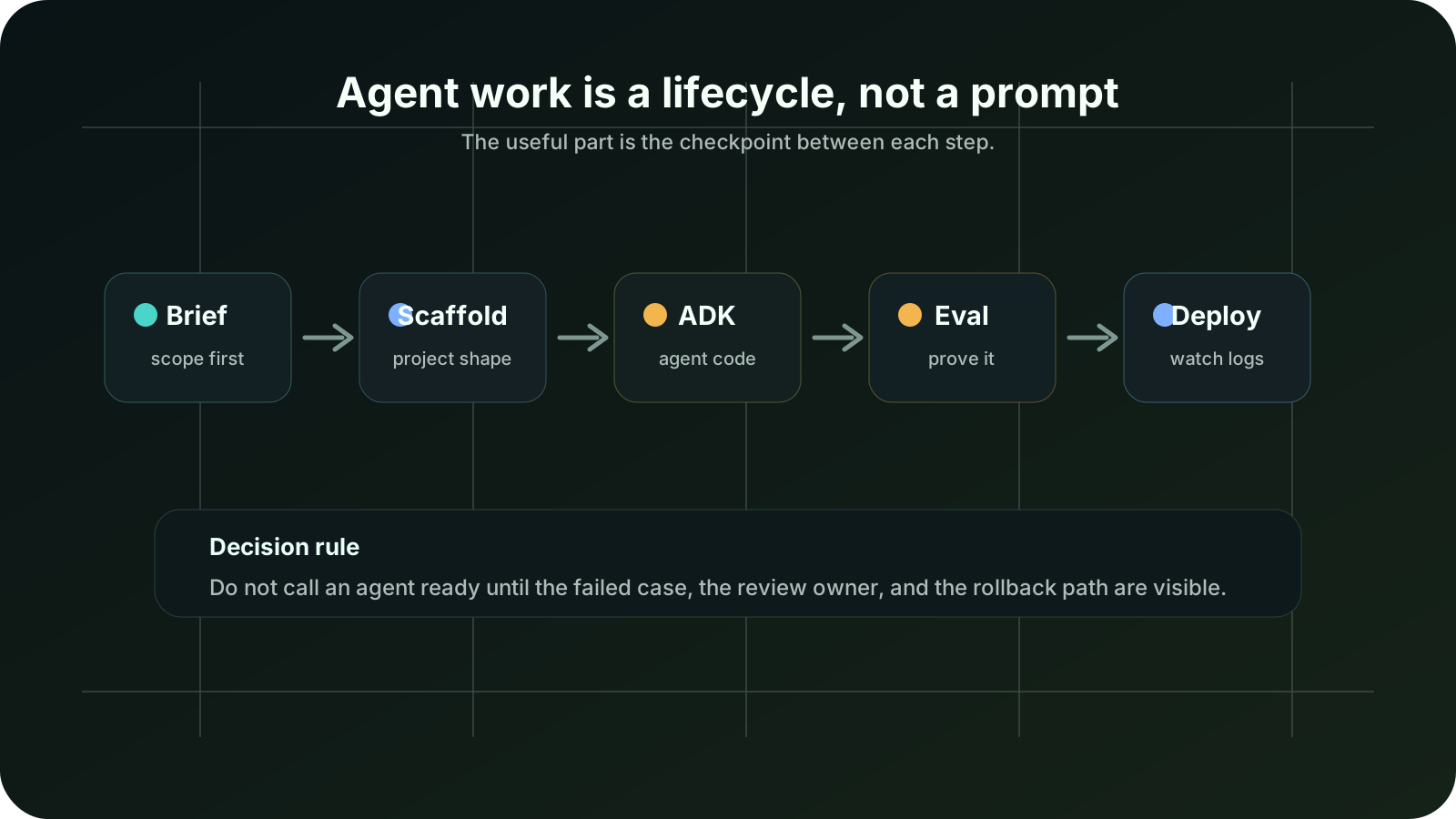
I treated ‘agents-cli’ as a lifecycle wrapper, not a magic builder.
| Step | What I want from the tool | What I would not trust yet |
|---|---|---|
| Setup | A repeatable environment with Python 3.11+, ‘uv’, Node.js, and the agent skills installed | A teammate copying commands from memory |
| Scaffold | A project shape that separates agent code, tests, evals, and deployment files | One folder full of generated files nobody reviews |
| ADK code | Clear agent behavior, tools, callbacks, and state handling | A prompt-only agent with no boundary |
| Evaluation | Test cases, grading, comparison, and failure analysis | “It answered my sample once” as proof |
| Deployment | A visible path to Agent Runtime, Cloud Run, or GKE | A cloud deploy with unclear owner or billing |
| Observability | Logs and traces that help explain failures | A production agent that nobody can inspect |
The official install path is simple enough: ‘uvx google-agents-cli setup’. If the goal is only to add skills to a coding agent, the docs also show ‘npx skills add google/agents-cli’. That is a low-friction start, but the real work begins after setup.
The checks I put next to it
I would keep three checks beside the first pilot.
First, I want a failed-case file. The agent should be tested against requests that are ambiguous, stale, or missing a key source. A clean example does not tell me much.
Second, I want a review owner. If the output goes to a person, the person must know what to approve and what to reject.
Third, I want a rollback note. If deployment changes behavior, someone should know how to stop it without holding a meeting.
Where it usually breaks
The break point is not the command line. The break point is usually confidence.
A generated agent can look tidy while still failing in ways that matter:
- it cites a policy paragraph but misses the version date,
- it routes an exception to the wrong owner,
- it writes a customer-ready answer when the case should stay internal,
- it passes the easy eval set and fails the messy requests,
- it deploys, but nobody watches the logs after the first day.
My failure criteria would be simple: if the agent invents a source, routes the case to the wrong owner, or leaves no log trail, I would stop using it for that workflow. Those are not small quality issues. They are signs that the operating design is too brittle.
This is why the evaluation part of ‘agents-cli’ matters more to me than the scaffold. The docs describe commands for generating evals, grading, comparing versions, analyzing failures, listing metrics, and optimizing prompts. If a team skips that loop, the CLI only makes a nicer first draft.
My operating call
I would use ‘google/agents-cli’ when three things are already true.
The team is comfortable with Google Cloud. The agent is likely to live near ADK, Agent Runtime, Cloud Run, GKE, or Gemini Enterprise. And someone can maintain evaluation cases after launch.
I would not make it the default for a small local automation, a one-off script, or a simple chatbot that does not need deployment machinery. In those cases the toolchain can become heavier than the job.
The safer pilot is narrow: one internal triage agent, one source set, one output format, one deployment target, and ten to fifty deliberately annoying evaluation cases.
Before you use the same setup
- Confirm whether native Windows is acceptable for your team. The current docs point Windows users toward WSL 2 rather than native Windows.
- Decide whether local AI Studio development is enough, or whether Google Cloud deployment is part of the real requirement.
- Write the eval cases before trusting the scaffolded agent.
- Keep at least one failed example in the repo.
- Name the reviewer, the cloud project owner, and the person who pays for usage.
- Do not grant execution or deployment rights before the logging path is clear.
- Treat LLM-as-judge as a screening step, not the final judge for sensitive decisions.
Sources I checked
I checked the official GitHub repo, the getting-started docs, CLI reference, evaluation guide, deployment guide, Google Cloud quickstart, Google Developers Blog post, and PyPI package page on July 6, 2026. I kept the sources narrow because this tool is moving quickly and secondary summaries can blur the difference between ADK, Agent Platform, and agents-cli.
The short answer
If your team already wants ADK agents on Google Cloud, ‘agents-cli’ is worth testing. If your real problem is just “I need a script to run a local task,” it is probably too much.
The sentence I would write on the pilot card is this:
Use ‘agents-cli’ to make the agent lifecycle inspectable, not to avoid thinking about the lifecycle.
That is the whole point. The CLI can help a coding agent remember the right steps. It cannot decide whether the agent should exist, whether the eval set is honest, or whether the organization is ready to operate it.
A two-hour pilot I would actually run
I would give the pilot two hours and no production rights.
Hour one: install the skills, scaffold a narrow agent, and write the design spec. The job should be boring enough that mistakes are obvious. The internal triage example works because the expected output is not subjective: source paragraph, review flag, owner, next action.
Hour two: write the first eval set and run grading. I would include clean requests, missing-source requests, stale-policy requests, and requests that should be rejected. Then I would compare the first version with one prompt or policy change.
If the second hour does not produce useful failure notes, I would not deploy. That sounds strict, but it is cheaper than discovering the failure pattern after the agent is already in someone’s workflow.
What I would write in the rollout note
| Rollout question | My answer before wider use |
|---|---|
| What is the agent allowed to read? | Only the named policy or source bundle |
| What is it not allowed to do? | Send final answers or change records without review |
| What proves it improved? | Review time drops without more corrections |
| What stops the pilot? | Source hallucination, wrong owner routing, or missing logs |
| Who owns the next version? | One named editor or platform owner, not “the AI team” |
This is the kind of note that makes the tool useful. Without it, ‘agents-cli’ is just another way to create software faster than the organization can operate it.
FAQ
Is google/agents-cli a replacement for Codex or Claude Code?
No. The official FAQ says it is a tool for coding agents, not a coding agent itself. I would describe it as a skill and command layer that helps a coding agent handle ADK agent work.
Can I use it without Google Cloud?
For local development, yes, the docs say AI Studio can be enough. For deployment and cloud features, Google Cloud is required.
Does it make production agents safe by default?
No. It can help with structure, evaluation, deployment, and logs, but the team still owns the eval set, permissions, source policy, and review boundary.
Where should a team start?
Start with a non-customer-facing internal triage agent. If it cannot pass a small but annoying eval set, do not widen access.
Workflow path
Where this guide fits
Use this section to connect the guide you are reading with the broader workflow it supports.
A path for comparing automation platforms, app builders, agent builders, bookkeeping tools, and general AI assistants.
Open workflow path- Best fit
- teams deciding whether to buy a simple tool, build an internal workflow, or adopt a broader platform
- Not ideal if
- You need step-by-step setup instructions more than a decision framework.
Sources checked
Main public pages used to check reported facts, official documentation, policy background, product details, and claims that may change.
- google/agents-cli GitHub repository Google
- Agents CLI getting started Google
- Agents CLI reference Google
- Agents CLI evaluation guide Google
- Agents CLI deployment guide Google
- Build an agent with ADK and Agents CLI in Agent Platform Google Cloud
- Agents CLI in Agent Platform: create to production in one CLI Google Developers Blog
- google-agents-cli on PyPI PyPI