Quick answer
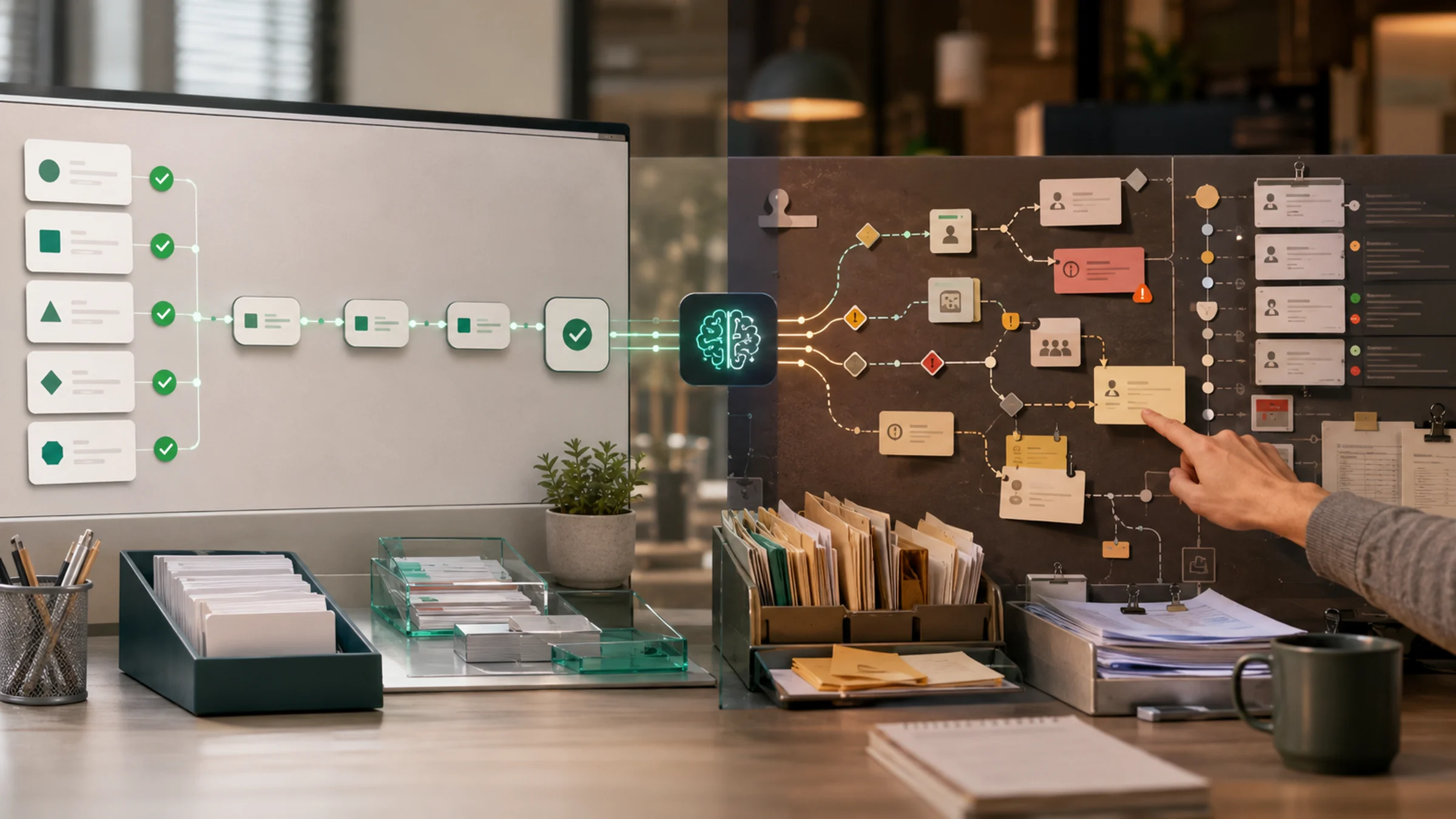
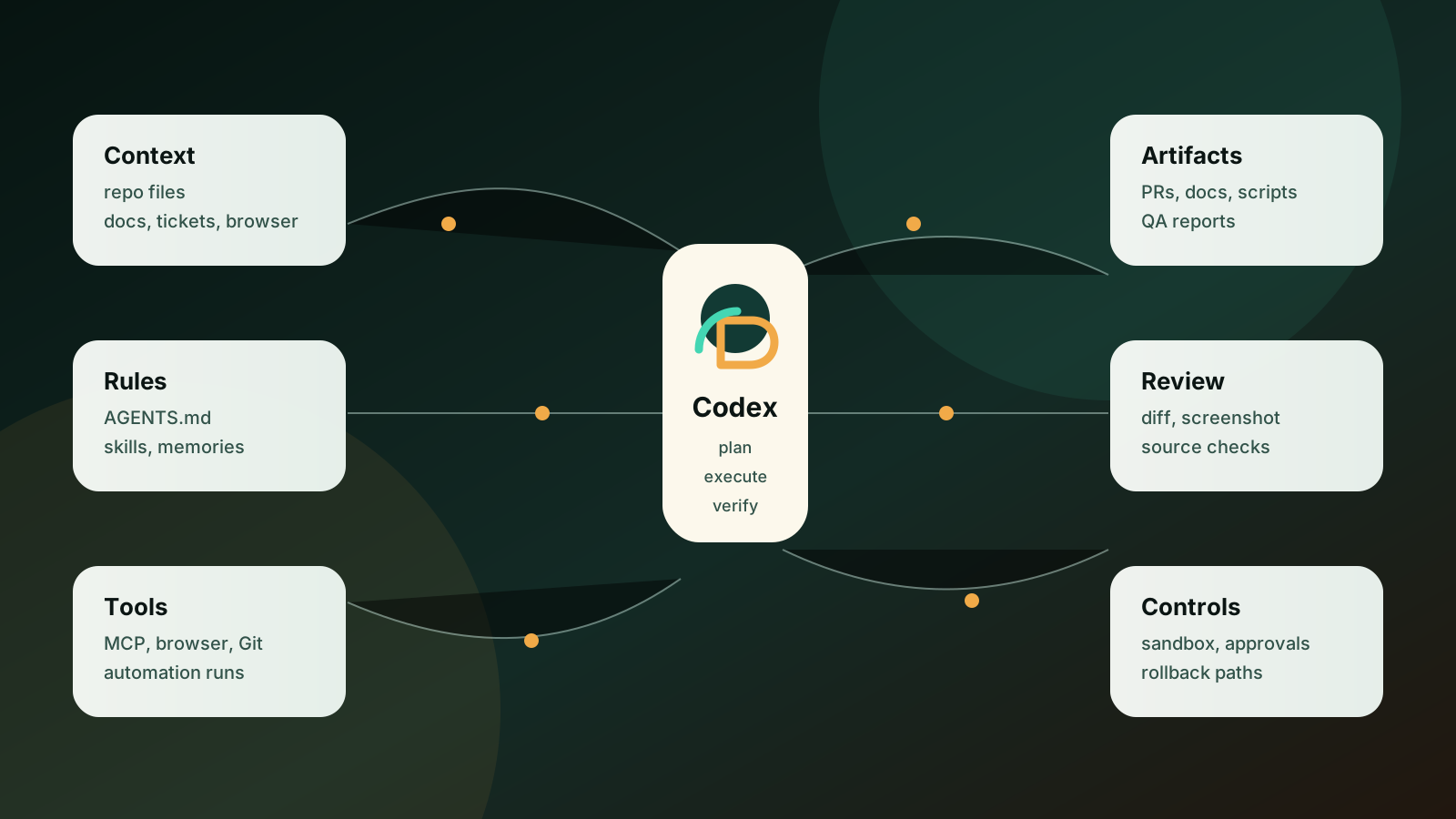
Codex is officially a coding agent for software development, but its practical surface is broader than code generation. Documents, repository rules, browser QA, GitHub review, skills, MCP, and automations can turn it into a work execution layer. The useful boundary is not whether Codex can produce text or code. It is whether the task has clear inputs, reviewable output, verification, permissions, and a rollback path.
- Codex starts with code, but the practical workflow now reaches documents, browser checks, Git changes, QA reports, and scheduled checks.
- The operating layer is built from AGENTS.md, plugins, skills, MCP, browser review, automations, and repository conventions, not from prompts alone.
- Good tasks are drafts, code changes, QA checks, docs maintenance, and repeatable audits where output can be reviewed and reverted.
- Payment actions, deletion, production credentials, customer-facing final messages, and permission changes need human approval and logs.
- Codex works best when the work has named inputs, owners, outputs, failure criteria, and verification commands.
- Best for
- Product, engineering, and operations teams that want to use Codex for documents, QA, workflow checks, and repeatable automation beyond code edits.
- Topic
- Automation
- Last checked
- Jun 16, 2026
- OpenAI Codex
- Codex app
- Codex CLI
- Codex IDE
- GitHub
- Codex plugins
- MCP
- Agent Skills
Workflow snapshot
A practical map for turning this guide into an automation flow.
- 01 Input
Define the recurring job, required data, owner, and success check before adding automation.
- 02 AI pass
Use AI for drafting, sorting, summarizing, routing, or tool calls only where the workflow has clear boundaries.
- 03 Human check
Keep approvals, exceptions, cost limits, and sensitive decisions under human review.
- 04 Output
Turn the result into a checklist, saved prompt, SOP, or monitored automation run.
- OpenAI Codex
- Codex app
- Codex CLI
- Codex IDE
- GitHub
- Codex plugins
- OpenAI Codex
- AI automation
- work automation
- MCP
- agent skills
Operator note
Do not turn a tool choice into an operating shortcut.
If inputs, review points, and failure logs are vague, automation only moves confusion faster.
Which operating rule should guide the decision?
Help readers judge where Codex fits as a work automation layer rather than treating it only as a code generator.
10 Sources checked
Check the linked source notes and product documentation before relying on claims that may change.
Comparisons
Move from reading to one small pilot, then expand only after the review point is clear.
- Codex starts with code, but the practical workflow now reaches documents, browser checks, Git changes, QA reports, and scheduled checks.
- The operating layer is built from AGENTS.md, plugins, skills, MCP, browser review, automations, and repository conventions, not from prompts alone.
- Good tasks are drafts, code changes, QA checks, docs maintenance, and repeatable audits where output can be reviewed and reverted.
- Payment actions, deletion, production credentials, customer-facing final messages, and permission changes need human approval and logs.
Workflow path
Where this guide fits
Use this section to connect the guide you are reading with the broader workflow it supports.
A path for comparing automation platforms, app builders, agent builders, bookkeeping tools, and general AI assistants.
Open workflow path- Best fit
- teams deciding whether to buy a simple tool, build an internal workflow, or adopt a broader platform
- Not ideal if
- You need step-by-step setup instructions more than a decision framework.
The first impression of Codex is straightforward: it is a coding tool. That is not wrong. OpenAI’s Codex overview describes it as a coding agent for software development, with work such as writing code, understanding unfamiliar codebases, reviewing code, debugging, and automating repetitive development tasks.
After using it for real work, the shape feels wider. Codex is not only answering a coding question. It is sitting inside a workspace. It reads files, edits documents, runs commands, checks a rendered page, takes screenshots, reviews a diff, and leaves work in Git. With skills and MCP, it can follow repeatable procedures and connect to external context. With automations, it can come back to a project on a schedule.
That does not make it a general office assistant. I would not sell it that way. The useful claim is narrower and more practical: Codex is becoming a work execution layer for tasks that already live near files, repositories, browsers, review steps, and verification commands.
That distinction matters. If you treat Codex as a clever chat box, you ask for opinions. If you treat it as an execution layer, you define inputs, outputs, review gates, and failure criteria. The second style is where the value starts to show.
The operating call
Codex is still officially framed around software development. The practical boundary, though, is not “code versus non-code.” The better boundary is “reviewable work versus unbounded action.”
Here is how I would split it before giving Codex more responsibility.
| Work item | Good fit for Codex | Why |
|---|---|---|
| Document drafts and revisions | Yes | The diff is reviewable and easy to revert |
| Code changes and tests | Yes | Repository rules and test commands provide verification |
| Browser QA | Yes | Screenshots and DOM checks leave evidence |
| Recurring workflow checks | Limited yes | Works when scope and sandbox are clear |
| Deployment commands | Human approval first | Failure impact is larger and rollback matters |
| Payment, deletion, permission changes | Default no | Recovery cost is high when the wrong action runs |
| Final customer-facing messages | Human approval | Context and accountability stay with the operator |
The question is not whether Codex is smart enough. The question is whether the work can be inspected, verified, and rolled back.
The shift from coding to work execution
A coding assistant is usually asked to fix a file, explain a function, or pass a test. That is useful, but it is still a narrow task. Work execution is larger. It includes context gathering, choosing the next step, changing files, checking the result, and leaving an artifact that another person can review.
Take a common website operation. “Publish a new article” is not only writing. It includes topic selection, source review, metadata, images, translations, build checks, responsive QA, Git commit, deploy, and index submission. A chat response is not enough. The work has to survive as files and verification evidence.
This is where Codex starts to feel different from a normal chatbot. It can touch the repository where the work lives. It can run the commands that prove the work. It can check the browser when the visual outcome matters. It can update the same instruction files that guide the next run.
That is the real move. The model matters, but the environment matters more.
Documents are the first place it pays off
The easiest place to feel the change is documentation. Not only developer documentation. Operating checklists, review notes, deployment records, editorial standards, policy copy, source ledgers, and workflow instructions all sit in files. Codex can read the old version, patch the specific gap, and leave a reviewable diff.
This is useful because most operational knowledge decays in quiet ways. A team changes the deployment process but forgets the runbook. A content rule gets discussed in chat but never enters the publishing checklist. A QA failure happens twice, then the same mistake appears again because no persistent rule was added.
Codex can help here, but only if the document has teeth. A useful document says who owns the step, what input is required, what output should exist, how to verify it, and what should stop the work. A weak document just sounds competent.
My failure signal is simple: if the document becomes longer but the next operator still cannot act, Codex did not improve the workflow. It produced words.
Browser QA changes the job
OpenAI’s in-app browser documentation describes a shared rendered page inside a Codex thread. It is meant for local development servers, file-backed previews, and public pages that do not require sign-in. Codex can use the browser to click, inspect rendered state, capture screenshots, and verify fixes.
This is not a cosmetic feature. It changes the job. Frontend work often passes the build and still fails on the screen. A mobile title wraps into a narrow column. A table looks clipped. A card image loads but crops the wrong subject. A language switch works on one locale and breaks another.
When Codex can inspect the page, the loop becomes more practical: change code, build, open the page, screenshot, inspect, fix, verify again. The human is not left reading a confident explanation of code that nobody has looked at.
There is a boundary worth respecting. The in-app browser does not carry your signed-in Chrome profile. OpenAI points users to the Chrome extension when existing tabs, cookies, extensions, or logged-in state matter. That is important for real operations. Admin consoles, ad platforms, payment systems, and private dashboards require a different permission conversation.
AGENTS.md and skills turn prompts into process
Repeated prompts are a weak operating system. If you have to explain the same publishing rule, test command, review style, or image requirement every time, you do not have a workflow yet.
Codex has two useful layers here. AGENTS.md keeps repository guidance close to the work. It tells Codex how this project behaves: which commands to run, which files matter, what tone to avoid, what must be verified before a commit. Skills package repeatable workflows with instructions, references, and optional scripts.
This is where a coding agent starts to look like an operating tool. You stop relying on a perfect one-off prompt. You write down how the work should be done, then let Codex reuse that process.
I would use a simple rule. One-off work stays in the prompt. Work that repeats three times belongs in AGENTS.md or a skill. Work that multiple people or multiple repositories need may deserve a plugin or an MCP-backed workflow.
Plugins are the bridge outside coding work
The part that makes Codex feel less like a pure coding tool is the plugin layer. OpenAI’s Codex plugins documentation describes plugins as reusable workflows that bundle skills, app integrations, and MCP servers. It also describes a plugin directory with a “Curated by OpenAI” category, and gives examples such as Gmail, Google Drive, Slack, and Sites.
That matters in real work. Code work lives mainly in the repository. Business work lives in documents, spreadsheets, PDFs, decks, emails, designs, dashboards, browser sessions, and collaboration history. When Documents, PDF, Spreadsheets, Presentations, Browser, Chrome, Data Analytics, Figma, Google Drive, SharePoint, Slack, Sales, and similar plugins are available, Codex can bring more of the real operating context into the same task.
The practical use cases are more specific than “connect more tools.” I would evaluate them like this:
Documents, PDF, Google Drive
Read proposals, meeting notes, policies, or PDFs and separate decisions, open items, owners, risks, and contradictions. A useful request is not “summarize this file”; it is “compare the proposal with the policy and list what would block approval.” Keep the document version and source location visible. A perfect summary of an outdated file is still bad work.
Spreadsheets, Data Analytics
Pull GA4 exports, Search Console tables, ad spend, content inventory, or support tickets into a working table and ask for anomalies, priority rows, and follow-up checks. For example, find pages with traffic but weak engagement, or sales leads with activity but no next step. The source range, formulas, filters, and aggregation method matter more than the prose.
Presentations
Turn a long planning memo into a seven-slide decision deck: problem, current state, options, recommendation, risk, timeline, and decision needed. After a meeting, Codex can produce the slide edits and speaker notes that actually changed. Decks fail when they sound polished but do not support a decision.
Browser, Chrome, Computer Use
Use Browser for public pages and local previews. Use Chrome when the task needs your signed-in browser profile, cookies, extensions, or admin pages. Use Computer Use for Windows desktop apps, downloaded files, exports, and older tools that do not expose a clean API. Viewing a screen is not the same as authorizing actions.
Figma, Product Design, Creative Production
Compare a Figma design with the live page, check mobile crops, button clarity, and visual hierarchy, or generate visual candidates from a brief and then QA them on the actual page. Do not approve visuals because they look premium in isolation.
Slack, SharePoint, Gmail, Sales
Turn a week of Slack discussion, shared docs, customer email, and sales notes into a decision log, unanswered questions, account brief, or follow-up draft. This is where Codex starts feeling like an operations assistant rather than a code assistant. Customer-facing text and external sending still need review.
Investment Banking, Public Equity Investing, Binance
Build research memos, market snapshots, comparable-company notes, or risk checklists from financial and market data. The value is not trading automation; it is faster research packaging and clearer assumptions. Treat outputs as research support, not advice.
The value is not the plugin count. The value is that Codex does not have to invent context. It can work from real documents, real tables, real screens, and real collaboration trails. I am comfortable opening read, compare, draft, and checklist workflows early. I would keep send, delete, payment, permission changes, publishing, and customer-facing final actions behind approval.
MCP makes the workspace wider
MCP in Codex connects Codex to external tools and context providers. That can mean documentation servers, GitHub, Figma, Sentry, browser tooling, or internal systems. The point is not novelty. The point is that real work rarely lives in one repository.
A feature change may require the issue ticket, the design, the code, the test result, the error log, and the pull request note. If Codex can see only the code, it can still help. If it can see the surrounding context through controlled connections, the quality of the work can improve.
MCP also raises the risk. A context provider that only reads docs is one thing. A tool that can create, modify, or delete production objects is another. I would not connect everything just because it is technically possible.
Before connecting an MCP server, I would ask:
| Question | Why it matters |
|---|---|
| Is this read-only or can it act? | Context and execution have different risk profiles |
| Can the token be scoped? | Broad tokens turn errors into incidents |
| Are tool calls logged? | Review needs evidence |
| Can destructive actions be denied? | Deletion should not be a casual capability |
| Who owns failures? | Workflow ownership must survive the demo |
If the answer is vague, keep the connection out of the critical path.
Automations are useful only with narrower permissions
Codex automations can run recurring work in the background. They can report findings to the inbox, attach to a thread, or run as standalone scheduled tasks. In Git repositories, they can run in the local project or a separate worktree.
That is useful for daily or weekly checks: stale documentation, broken builds, visual regressions, sitemap checks, source ledger gaps, or review follow-up. It is also risky if the automation has broad write access and nobody is watching.
My rollout would start with read-heavy checks. Let Codex inspect and report. Then allow narrow file edits where the diff is easy to review. Only later would I allow automatic fixes, and I would still keep deploys, deletion, external account changes, and customer-facing sends behind approval.
The failure criteria are concrete. Stop or narrow the automation if it creates noisy diffs, repeats the same mistake, cannot explain its changes, or makes verification harder. A scheduled agent that produces cleanup work for humans is not automation. It is a new queue.
Where Codex fits today
The best fit is work with a visible artifact and a verification loop. Examples:
- update a policy page and run the build
- compare a runbook with the current deploy script
- fix a mobile layout and attach screenshots
- write a PR description from the actual diff
- scan source files for missing metadata
- create a migration plan and mark the risky steps
- review a pull request for P0 and P1 issues
- turn a repeated manual check into a skill-backed workflow
I would avoid using Codex as the default actor for work where the output leaves the workspace before a person reviews it. Customer emails, invoices, refunds, permission grants, account deletion, legal decisions, and live production changes belong behind stricter gates.
That is not a criticism of Codex. It is basic operating hygiene.
The field judgment
If I had to present this to a product or operations meeting, I would not start with “let’s adopt Codex.” I would start with the work inventory.
Which repeated tasks already live in files? Which checks are run manually? Which browser screens must be inspected after every change? Which documents keep drifting away from reality? Which tasks are annoying enough to repeat but safe enough to review?
That list tells you where Codex belongs. If the task has clear input, a reviewable output, a known owner, and a verification command, Codex is a strong candidate. If the task depends on tacit judgment, broad credentials, production side effects, or customer-facing final decisions, I would not make Codex the default actor.
The non-selection case matters. Do not choose Codex for a workflow simply because the team is tired. Choose it when the workflow can be written down, checked, and corrected. Otherwise, the agent will only make the ambiguity move faster.
The bottom line
Codex is not magically turning every office task into automation. It is still rooted in software development. But the workplace around software is full of documents, checks, reviews, browser screens, workflows, and recurring maintenance. That is the gap Codex is starting to fill.
The practical move is not “give the AI more work.” The move is to make work executable: context in files, rules in AGENTS.md, repeatable procedures in skills, external context through MCP, browser evidence for visual work, and narrow automations for recurring checks.
My working rule is this: give Codex work that can leave evidence. If it cannot be reviewed, verified, or rolled back, keep a person in the loop.
FAQ
Is Codex officially a general work automation tool?
No. OpenAI describes Codex as a coding agent for software development. The broader work automation pattern comes from the way Codex can operate around files, browser checks, Git workflows, skills, MCP, and scheduled automations.
Can I use Codex for documents?
Yes, when the documents are file-based and reviewable. Runbooks, policies, checklists, and project notes are good candidates. Final external messages still need human approval.
Should automations edit files automatically?
Not at first. Start with inspection and reporting. Add narrow file edits only when the output is easy to review and the failure path is clear.
What is the main difference from a chatbot?
A chatbot gives an answer. Codex can work inside the repository, change files, run commands, inspect pages, and leave artifacts that can be reviewed in Git.
Sources checked
Main public pages used to verify product details, pricing context, and comparison claims in this guide.
- Codex overview OpenAI
- Codex automations OpenAI
- Codex in-app browser OpenAI
- Codex Chrome extension OpenAI
- Agent Skills OpenAI
- Codex plugins OpenAI
- Codex customization OpenAI
- Model Context Protocol in Codex OpenAI
- Codex code review in GitHub OpenAI
- Codex subagents OpenAI