AI search is useful because it removes the blank-page moment. It is risky because a confident answer can still hide a weak source, an old date, or a claim the cited page does not really support.
That last part is why people relax too early. A link beside an answer feels like proof. It is not always proof. Sometimes the source is old. Sometimes the source says something narrower than the AI answer. Sometimes the answer blends two articles into one confident sentence. Sometimes the citation is real, but it does not support the claim being made.
I still use AI search. I just do not give it the same job for every question. For low-risk questions, it is a good first pass. For anything that could cost money, change health decisions, create legal exposure, mislead a customer, or send someone in the wrong direction, I slow down and check the source myself.
The part I would verify first
My working rule is this: use AI search to find the path, not to sign the decision.
| Question type | AI answer is usually enough for | Open the source yourself when |
|---|---|---|
| General explanation | Vocabulary, background, first orientation | You will quote it, teach it, or make a decision from it |
| Product research | Building a shortlist | Price, refund terms, feature limits, or contract terms matter |
| News | Understanding the rough issue | The event is breaking, political, legal, financial, or security-related |
| Health | Learning terms before a proper source | Medication, diagnosis, dosage, symptoms, or urgent action are involved |
| Money | Learning concepts | You might buy, sell, borrow, insure, or advise someone |
| Travel rules | Finding likely government pages | Visa, customs, tax, passport, or entry rules affect the trip |
| Work decisions | Drafting a first view | A customer, employee, system, or budget will be affected |
The point is not to distrust every answer. The point is to match verification effort to risk. A recipe substitution and a medication interaction do not deserve the same checking routine.
Why AI search feels more trustworthy than it is
Classic search results leave some work visible. You see several blue links, skim titles, notice the domain, and decide where to click. AI search hides part of that work. It reads, compresses, and writes an answer before you see the raw material.
That compression is useful. It is also where mistakes become harder to notice.
Google has been pushing AI Mode and AI Overviews as a way to ask more complex questions and move across search results with generated help. OpenAI presents ChatGPT search as a way to get timely answers with links to web sources. Perplexity and similar tools made citation-style answers feel normal. The direction is clear: the answer box is becoming a first screen, not a side feature.
The risk is equally clear. The Tow Center at Columbia Journalism Review compared AI search engines on news citation tasks and found that citation reliability was poor across tools. A separate survey paper on reasoning-model users reported that AI-generated or fabricated sources still appear in real use. I do not read those findings as “never use AI search.” I read them as a warning about overconfidence.
If a system can answer quickly, cite something, and still point to the wrong support, the reader has to keep one final job: decide when the answer is good enough and when the original page has to be opened.
Field notes
The most useful habit I have found is separating three things that AI often blends together:
- What the source actually says.
- What the AI inferred from that source.
- What decision I am about to make.
Those are not the same. A source might say “this rule applies from July 1.” AI may infer “this rule applies now.” My decision might be “book the trip today.” If the current date, country, plan type, or product tier is different, that small inference can be the whole problem.
This is the same pattern I use in work reviews. I do not ask whether the answer sounds smart. I ask whether the source is strong enough to support the decision. If it is not, I treat the answer as a lead, not as evidence.
The risk map I actually use
Not every question needs the same level of checking. I would split AI search use into four lanes.
| Lane | Example | Verification level |
|---|---|---|
| Low risk | “What does this term mean?” | AI answer plus common sense is usually fine |
| Medium risk | “Which app should I try first?” | Open product pages and recent reviews before buying |
| High risk | “Can I do this under a contract, policy, or rule?” | Open the official source and keep a note of the date |
| Do not decide from one AI answer | “Should I change medication, invest, fire someone, migrate data, or ignore a warning?” | Use AI only for preparation; rely on qualified sources or accountable people |
The signal is simple. If a wrong answer would only waste five minutes, AI can do more of the early work. If a wrong answer would create cost, safety risk, customer harm, compliance trouble, or public embarrassment, the generated answer is not enough.
A five-minute checking routine
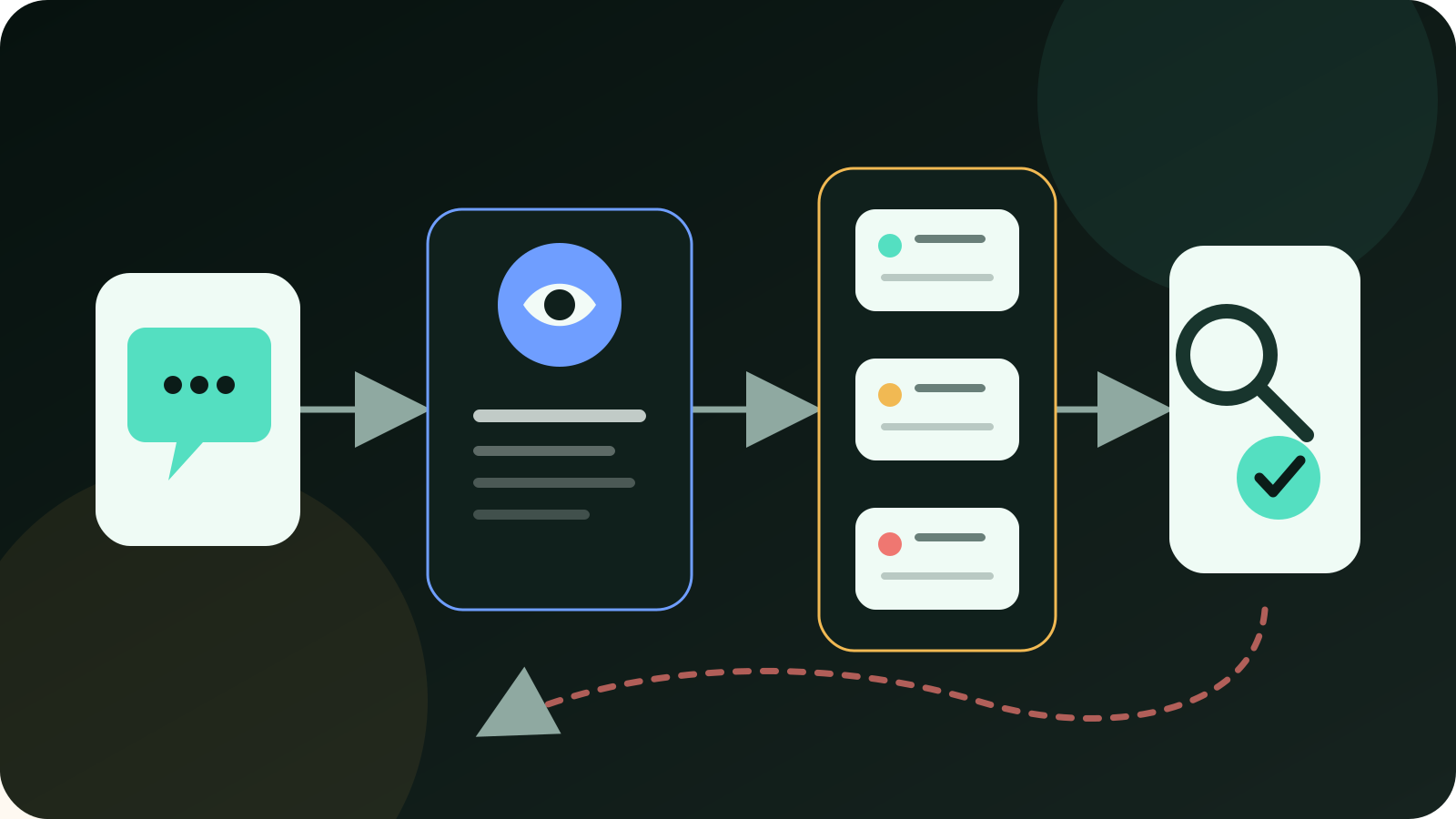
This is the routine I would teach someone before they let AI search replace normal search.
- Ask for the source list first. Do not accept a paragraph without knowing what it used.
- Open the most important source. One original source is better than five repeated summaries.
- Check the date. Old pages are a common reason answers feel right but fail in practice.
- Look for the exact claim. If the source does not say the claim directly, mark the answer as an inference.
- Compare one independent source. For news, rules, pricing, or health, one extra source catches many bad answers.
- Ask what could be wrong. A good follow-up is: “Which parts of this answer are uncertain or depend on date, location, plan, or policy?”
- Decide the action boundary. Is this only for learning, or will someone act on it?
That sounds slower than AI search. In practice, it is faster than repairing a bad decision later.
Concrete cases where mistakes hide
The easiest way to see the problem is through ordinary questions.
Travel rule. An AI answer says a visa is not needed for a short trip. That may be true for one passport, one route, and one trip length. It may be false if the traveler has a different nationality, a transit stop, a work purpose, or a rule change after the source was written. I would open the government immigration page and check the date before booking.
Software pricing. AI says a tool includes a feature on the standard plan. Pricing pages change often. Community posts and old review pages are especially dangerous here. I would open the vendor pricing page, compare the plan table, and look for usage limits, add-ons, and “contact sales” exceptions.
Health symptom. AI can explain a medical term in plain language. That is useful. I would not use it to decide medication, dosage, emergency action, or whether a symptom can be ignored. The safer use is to prepare better questions for a clinician or to read a medical institution page with the source open.
Investment headline. AI summarizes why a stock or crypto asset moved. That can be helpful background. It should not be treated as a trading signal. Check the filing, exchange notice, company release, central-bank statement, or official data page before money moves.
School assignment. AI gives a neat explanation with three citations. A student still needs to open those sources and make sure the cited page actually supports the paragraph. Teachers can usually tell when a paper has citations that look real but do not match the claim.
Work memo. AI summarizes a vendor contract and says a clause is “standard.” That word is dangerous. Standard for whom? Under which country, plan, data type, or contract year? I would mark the clause, quote the exact text, and ask the accountable owner before it goes into a recommendation.
How I would ask AI to make verification easier
Most people ask AI search for an answer. I prefer asking it for a working packet.
Use prompts like these:
- “Separate verified facts, likely inferences, and your own judgment.”
- “List the source used for each important claim.”
- “Give me the publication date or last updated date for each source.”
- “What part of this answer could change by country, date, product plan, or user type?”
- “Which claim should I verify manually before acting?”
- “Find the official source, not a blog summary, for this rule.”
- “If two sources disagree, show the disagreement instead of merging them.”
These prompts do not make the system perfect. They make the review surface clearer. That is the practical win.
Red flags
My failure signal is simple: I would not trust the AI answer as-is when any of these show up:
- no source is provided for a specific number, rule, price, or date;
- the source is a forum post, social screenshot, or republished summary;
- the answer says “currently” but the source is old;
- the source talks about one country, product tier, or user group while the answer generalizes it;
- the answer has exact confidence but vague evidence;
- two sources disagree and the AI hides the disagreement;
- the result would affect health, money, legal exposure, security, employment, travel, or another person’s customer experience.
When those signals appear, I do not polish the prompt first. I go back to the source.
When AI search is still the right tool
There are plenty of times when AI search is the better first move.
It is good for turning scattered reading into a plain-language map. It is good for explaining vocabulary before you open technical material. It is good for finding the official source you should read next. It is good for comparing the shape of a topic before you decide where to spend time.
I use it most comfortably when the output is reversible: a reading list, a draft question, a list of possible sources, a summary of disagreement, a table of options, or a checklist for later review.
I use it least comfortably when the output becomes an action: buy this, ignore this symptom, send this customer reply, change this contract, move this money, delete this data, or tell another person what to do.
A simple rule for everyday readers
If the answer is only helping you understand, AI search can be fast and useful. If the answer is helping you decide, slow down. If the answer affects someone else, open the source.
That one rule handles most cases better than a long policy.
Keep the evidence with the decision
This source-researched workflow is a checking aid, not evidence that an AI answer is true or suitable for your decision. Use the checklist to capture the source, date, support for the exact claim, conflicts, and remaining uncertainty before you act. Download the AI claim verification checklist.
Questions before trusting the answer
Is AI search worse than normal search?
Not necessarily. Normal search also returns bad pages. The difference is that AI search can make a weak source sound clean and final. The reader has to check the source-to-claim link more deliberately.
Are citations enough?
No. A citation proves that a source exists, not that the source supports the exact answer. Open the key source and look for the claim.
Which AI search tool is safest?
I would not choose based on brand alone. Check how it handles sources, dates, disagreement, and uncertainty. The safest tool for one question may be the wrong tool for another.
Should students use AI search?
Yes, for orientation and source discovery. No, not as a replacement for reading the source. A paper with mismatched citations is worse than a rough paper with honest sources.
What is the fastest manual check?
Open the official or original source and check the date. That single step catches a surprising number of bad answers.
References and reporting
Public pages used for reported facts, official documentation, policy background, product details, and claims that may change.
- Google Search AI Mode updatesGoogleUsed for: AI search direction; source-link framing; Google AI Mode contextChecked: 2026-08-25
- Introducing ChatGPT searchOpenAIUsed for: ChatGPT search positioning; links to web sourcesChecked: 2026-08-25
- ChatGPT search helpOpenAI Help CenterUsed for: ChatGPT search behavior; availability and source guidanceChecked: 2026-08-25
- We compared eight AI search engines. They're all bad at citing news.Columbia Journalism Review / Tow CenterUsed for: citation accuracy risk; news verification warningChecked: 2026-08-25
- Reasoning Models in the Wild: A User SurveyarXivUsed for: AI-generated source risk; overreliance warningChecked: 2026-08-25
- Pexels photo 7545295Pexels / SHVETS productionUsed for: featured imageChecked: 2026-08-25