Quick answer
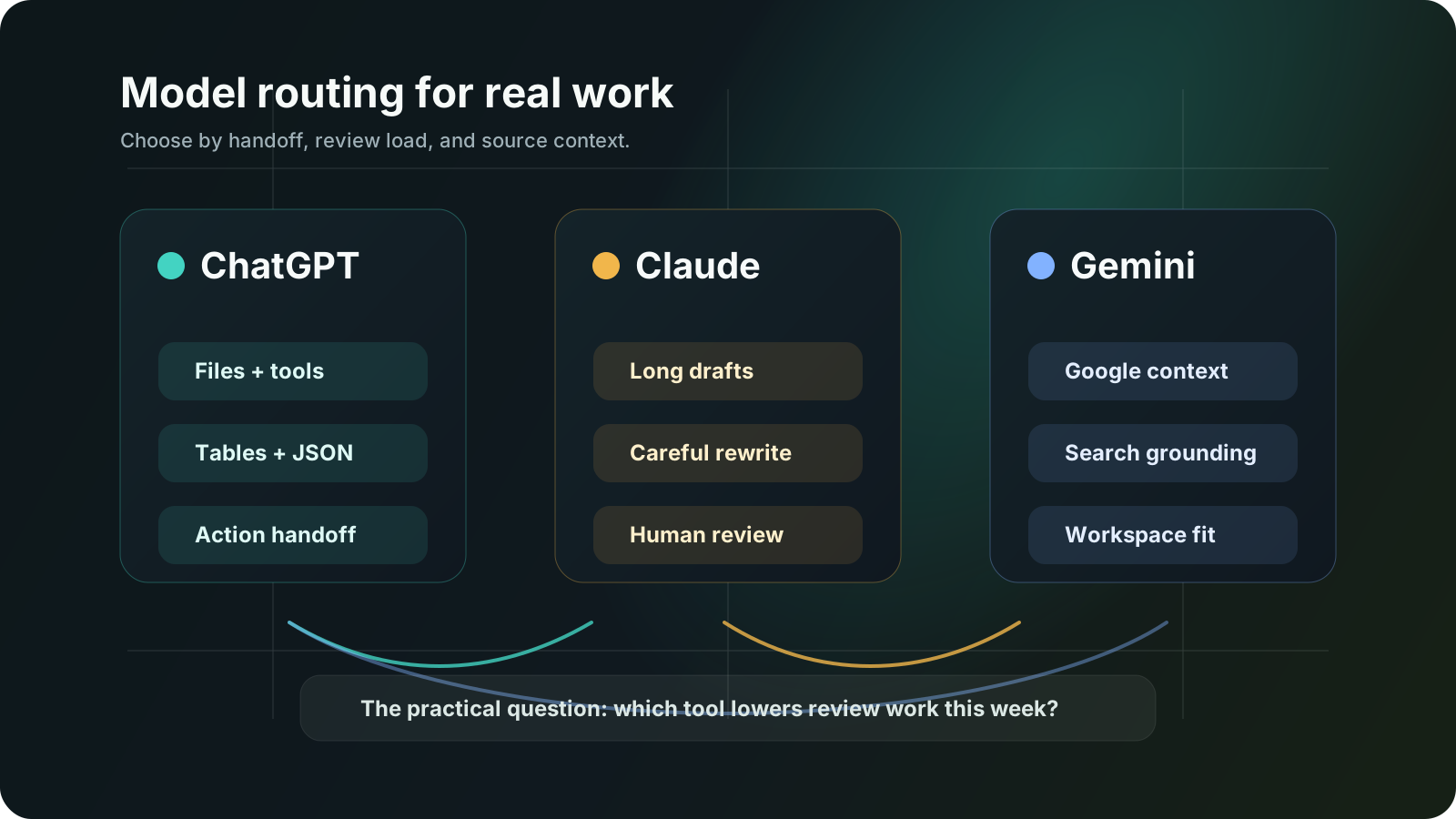
If the work mixes documents, browser steps, code, and structured outputs, I would usually start with ChatGPT. If the work needs slower reading, cleaner rewriting, and steadier judgment on long text, Claude is often the better fit. If the team already lives in Google Workspace and leans on search-grounded answers, Gemini deserves a much more serious look than it usually gets.
- There is no permanent winner. The better choice depends on what kind of work enters the queue and what kind of output has to leave it.
- ChatGPT is strongest when the job spans files, structured outputs, tool use, and handoff into real automation.
- Claude is easy to like when the work is reading-heavy, writing-heavy, or sensitive to tone, logic, and overconfident wording.
- Gemini becomes more compelling when the team already works inside Gmail, Docs, Meet, and Google-style search workflows.
- The wrong buying habit is comparing one prompt. The right habit is checking where review effort drops after a week of real work.
- Best for
- Teams comparing ChatGPT, Claude, and Gemini for document-heavy work, analysis, research, and AI automation design.
- Topic
- AI Tools
- Last checked
- Jun 18, 2026
Workflow snapshot
A practical map for turning this guide into an automation flow.
- 01 Input
Define the recurring job, required data, owner, and success check before adding automation.
- 02 AI pass
Use AI for drafting, sorting, summarizing, routing, or tool calls only where the workflow has clear boundaries.
- 03 Human check
Keep approvals, exceptions, cost limits, and sensitive decisions under human review.
- 04 Output
Turn the result into a checklist, saved prompt, SOP, or monitored automation run.
Operator note
Do not turn a tool choice into an operating shortcut.
If inputs, review points, and failure logs are vague, automation only moves confusion faster.
Which part of this workflow should the tool own, and which part stays with a person?
Help readers decide whether ChatGPT, Claude, or Gemini fits the actual work their team does each day.
5 Sources checked
Check the linked source notes and product documentation before relying on claims that may change.
Comparisons
Move from reading to one small pilot, then expand only after the review point is clear.
- There is no permanent winner. The better choice depends on what kind of work enters the queue and what kind of output has to leave it.
- ChatGPT is strongest when the job spans files, structured outputs, tool use, and handoff into real automation.
- Claude is easy to like when the work is reading-heavy, writing-heavy, or sensitive to tone, logic, and overconfident wording.
- Gemini becomes more compelling when the team already works inside Gmail, Docs, Meet, and Google-style search workflows.
Workflow path
Where this guide fits
Use this section to connect the guide you are reading with the broader workflow it supports.
A path for comparing automation platforms, app builders, agent builders, bookkeeping tools, and general AI assistants.
Open workflow path- Best fit
- teams deciding whether to buy a simple tool, build an internal workflow, or adopt a broader platform
- Not ideal if
- You only need a narrow tutorial for one product instead of a tradeoff-based buying decision.
People ask this question as if there should be one clean winner. There usually is not. In real work, the better question is simpler: when the inbox fills up, the documents pile up, and someone wants an answer today, which tool actually reduces friction instead of adding another layer to review?
That is the lens I use here. Not benchmark theater. Not one prompt posted on social media. Actual work: long documents, messy notes, vendor comparisons, planning memos, spreadsheet interpretation, research with sources, and the awkward handoff between “good answer” and “usable output.”
The short answer
| If your work looks like this | Start here | Why |
|---|---|---|
| Mixed work across files, tables, browser steps, structured outputs, and automation hooks | ChatGPT | It is the easiest place to start when the work must move from answer into action |
| Long reading, rewriting, memo cleanup, tone control, and careful argument review | Claude | It tends to feel steadier when the work is text-heavy and judgment-heavy |
| Google-native work across Gmail, Docs, Meet, search, and source-grounded research | Gemini | It has a cleaner path when your team already lives in the Google stack |
| One team wants a single winner for every job | None of them | That is usually the first mistake |
What the official docs actually say
OpenAI describes GPT-5.5 as its newest frontier model for complex professional work. The current model page lists a 1,050,000 token context window, 128,000 max output tokens, text and image input, and adjustable reasoning.effort. That matters because it tells me ChatGPT-class workflows are no longer only about chat. They are about longer working memory, controlled reasoning depth, and outputs that can be shaped for downstream tools.
Anthropic’s current guidance is also worth reading carefully. Their models overview says that if you are unsure where to start for the hardest tasks, you should consider Claude Opus 4.8. The same page positions Claude Sonnet 4.6 as the best balance of speed and intelligence. In other words, “Claude” is not really one thing anymore. In practice, many teams will experience Claude through the faster default lane first, then move to Opus when the work gets heavier.
Google’s Gemini 2.5 Pro page is unusually explicit about workflow surfaces. It lists 1,048,576 input tokens, 65,536 output tokens, and support for code execution, file search, function calling, search grounding, structured outputs, thinking, and URL context. That is not a small detail. It means Gemini is not only being sold as a writing model. Google is presenting it as an engine for mixed-input, grounded, tool-aware work.
Where ChatGPT usually wins
If I need one system to move between draft creation, code-like structure, tool calling, file handling, and automation prep, ChatGPT is still the easiest recommendation.
That does not mean it writes the prettiest paragraph every time. It means the path from “figure this out” to “turn this into a reusable output” is shorter. In actual teams, that matters more than demo quality.
Typical examples:
- take a long vendor brief and turn it into a decision table,
- compare two policy PDFs and surface the delta,
- read a messy note dump and turn it into an action list,
- prepare structured JSON that another workflow can actually consume,
- move from a browser finding to a tracked checklist or spec.
This is why I usually put ChatGPT first when the work is broader than writing. If the end result needs to leave the conversation and enter a system, a sheet, a tracker, a patch, or a repeatable process, it has an operational advantage.
Where Claude usually feels better
Claude is the one I keep reaching for when the work is less about “do many things” and more about “read this carefully and don’t ruin the tone.”
That is a different category of usefulness. A lot of business work is not automation-first. It is memo-first. Proposal-first. Policy-first. Internal alignment-first.
This is where Claude often feels better:
- rewrite a muddy document without making it sound synthetic,
- review a long draft and point out where the logic jumps,
- tighten a note for executives without turning it into marketing copy,
- read several long passages and hold the thread without getting noisy.
Anthropic’s product surface also leans into projects, collaboration, research, web search, and connectors. That matters for teams that care more about knowledge work than tool orchestration. If your pain is “our writing and review process is slower than it should be,” Claude is often easier to like than a feature checklist would suggest.
Where Gemini is stronger than people admit
Gemini gets underestimated because people often evaluate it in the wrong setting.
If someone opens all three tools in a blank tab and asks which one feels smartest, that is not the most generous setup for Gemini. The better setup is this: the team already lives in Gmail, Docs, Meet, and Workspace, and a large part of the job is gathering information, grounding it, and keeping it close to those tools.
Google’s own documentation points straight at that use case. Gemini 2.5 Pro supports search grounding, URL context, function calling, code execution, and file search. Google Workspace pricing also makes clear that Gemini surfaces inside Gmail, Docs, Meet, and more depending on plan level.
That changes the buying decision. If your daily work begins in Google rather than a standalone AI tab, Gemini can be the path of least resistance.
I would look harder at Gemini when:
- the team already runs heavily on Google Workspace,
- search-grounded answers matter more than freeform writing style,
- inputs include documents, links, PDFs, and mixed media,
- the cost of context switching is higher than the cost of model quality tradeoffs.
The comparison mistake I see most often
Teams compare output quality on one clean prompt and ignore review cost over five days of real use.
That is how they end up buying the wrong product.
The real questions are less glamorous:
- Which tool gives you the fewest “almost right” answers that still need manual repair?
- Which tool leaves output in a form another person can actually use?
- Which tool fits where your documents already live?
- Which tool creates the least annoying approval burden before anything customer-facing goes out?
- Which tool is easiest to standardize across a team instead of one power user?
I would rather have a slightly less impressive first draft that survives handoff than a beautiful answer that dies in copy-paste.
A practical two-hour evaluation
If you are seriously deciding, do not run one prompt. Run one work packet.
Mine would look like this:
| Test block | What to include | What to watch |
|---|---|---|
| Document digestion | One long brief, one messy note set, one conflicting source | Which tool stays coherent without becoming vague |
| Rewrite pass | One draft that is useful but clumsy | Which tool improves it without flattening the voice |
| Research pass | One question that needs cited, current, grounded answers | Which tool makes it easier to trust the result |
| Structured output | Ask for a table, checklist, or JSON-ready summary | Which tool leaves the cleanest handoff artifact |
| Team fit | Have someone else reuse the output | Which tool produces work another person can continue |
At the end, do not score “intelligence.” Score:
- time saved,
- review effort,
- handoff quality,
- repeatability,
- confidence before external use.
So which one would I pick?
If I had to give one blunt answer per situation:
| Situation | My pick |
|---|---|
| One general-purpose work assistant for mixed professional tasks | ChatGPT |
| One assistant for reading, rewriting, and careful internal writing | Claude |
| One assistant for Google-centered teams and grounded research flows | Gemini |
| One model for every workflow in the company | I would not do that |
That last line matters. The most expensive habit is turning a model choice into an identity choice. Teams defend the model they like instead of routing work to the model that fits it.
My operating call after one working week
If I had to set a default for a service-planning team that handles product notes, internal memos, vendor reviews, issue triage, and light automation design, I would still put ChatGPT in the first lane. The reason is not that it always writes the nicest answer. The reason is that it leaves behind outputs that travel better. Tables are easier to reuse, checklists are easier to hand off, and structured drafts are easier to feed into the next system without another round of cleanup.
That said, I would not force every job through the same lane. In actual operation, the split usually becomes obvious after a week. When reviewers keep softening tone, repairing logic, or rewriting paragraphs before anything goes to leadership, Claude earns its place. When the question starts in Gmail, ends in Docs, and needs grounded links more than polished prose, Gemini stops looking like an outsider and starts looking like the lower-friction route.
The metric I care about most is not “best answer quality.” It is edit burden. If one model gives a slightly weaker first pass but saves fifteen minutes of reformatting and handoff every day, that model is doing more useful work.
When I would not choose each one
This is where teams usually make the expensive mistake.
| Model | I would not make it the default when… | Failure signal I would watch |
|---|---|---|
| ChatGPT | the team mainly needs long reading, rewrite judgment, and politically careful internal writing | reviewers keep saying “the shape is fine, but I still have to calm the wording down” |
| Claude | the work must leave the chat as JSON, tables, browser findings, tracked actions, or tool-ready structure | the output reads well but someone still rebuilds the artifact by hand before it can move |
| Gemini | the team does not actually live in Google Workspace and source-grounded context is not the bottleneck | people keep copying work out of Gemini into another stack because the real handoff lives elsewhere |
My stop rule is simple. If the same type of task still needs heavy repair after five to ten reviewed runs, I do not call that “close enough.” I move the task to another model or narrow the model’s role. A model that looks smart in isolation but adds friction to review, routing, ownership, or approval is not helping the workflow.
Final judgment
ChatGPT, Claude, and Gemini are all good enough now that the buying mistake is no longer “picked a bad model.” The buying mistake is “used the wrong judging criteria.”
ChatGPT is the strongest default if the work crosses files, structure, and execution surfaces. Claude is still the one I would keep close for slower reading and stronger editorial judgment. Gemini becomes much more attractive when the real work already sits inside Google’s environment and grounded answers matter.
If you are choosing for a team, do not ask which model sounds smartest in a vacuum. Ask which one makes your weekly work feel less wasteful.
FAQ
Is ChatGPT always the best choice for work?
No. It is often the best default when the work spans tools and outputs, but not always the best writing or review environment for every team.
Is Claude better than ChatGPT for writing?
Sometimes, yes. Especially when the work is long-form, tone-sensitive, or internally political. But that does not automatically make it the better automation choice.
Is Gemini only worth it for Google users?
Not only for them, but Google-heavy teams should take it more seriously than they usually do. Stack fit is part of model quality in practice.
Should a company standardize on one model?
Only if governance is the main goal and the workflows are narrow. Most teams get better results by naming a default model and a few approved exceptions.
Sources checked
Main public pages used to verify product details, pricing context, and comparison claims in this guide.
- OpenAI GPT-5.5 model documentation OpenAI
- Anthropic models overview Anthropic
- Claude pricing and plan features Anthropic
- Gemini 2.5 Pro model page Google
- Google Workspace pricing Google